Salesforce Summer '23 Release
Exploring the Salesforce Summer '23 Release for Service Cloud
The new Salesforce Summer '23 Release is bringing some great new features to Service Cloud. Stef van den Oever, our Practice Manager Customer, loves to tell you all about it!
Improvements for the email channel
The Summer ’23 release brings great improvements to the email channel in Service Cloud! For example, you will have the ability to upgrade the email composer to the new Lightning Editor that brings great features like:
- Table creation and editing functionalities
- Full-screen mode
- Search & Replace
- And much more
The Lighting Editor brings all the features you’ve come to expect from modern text editing applications to Salesforce. And even better: You will also be able to implement it in other text-heavy Service Cloud areas like Knowledge.
To make email even better: Salesforce now offers a template flow solution for linking an email-to-case case to a contact if the match couldn’t be made automatically because the same email address is found on more contact records.
Once enabled, this update replaces the email editor in both docked and case feed email composers. The Lightning Editor, available as a beta feature in Lightning Experience, provides an updated user interface alongside a host of new features, including full-screen mode, print-from-menu functionality, undo and redo buttons, and smart copy-paste. Notably, this editor complies with Salesforce security standards, ensuring a secure user experience.
This change is applicable across Essentials, Professional, Enterprise, Performance, Unlimited, and Developer editions in Lightning Experience. Salesforce will enforce this update in Summer ’24. To ascertain the major release upgrade date for your instance, head over to Trust Status, search for your instance, and click the maintenance tab.
The reason behind this change? Salesforce is retiring the existing email editor in the docked and case feed email composers, transitioning to a feature-rich HTML text editor based on the open-source TinyMCE editor. This new editor ensures consistent functionality in both docked and case feed email composers in Lightning Experience. Agents will now be able to upload images, attach files, use merge fields, and apply email templates with ease.
After enabling this release update, users will see similar functionality when composing and editing emails. Bear in mind that for certain plugins and complex features, such as tables, beta limitations may apply. If you wish to revert to the previous editor, simply disable the release update.
Interruptible capacity in Omnichannel (pilot)
A challenge that we would often face when implementing Omnichannel routing is the way capacity of an agent is calculated. For example: If an agent is working on a long-running task like a case, which is not essentially time critical, this agent’s capacity could be at 100%. If a time-critical task then comes in, like a phone call or chat, the customer would have to wait until capacity is freed up and the agent would have no notion of this more time-critical task being present.
Well, say welcome to the interruptible capacity pilot in Omnichannel routing which allows you to set two different capacity levels: Overall capacity and interruptible capacity. This way you can allow not time-critical task that are long running to be interrupted by a task that needs a timely follow-up like a chat or call.
This change applies to Lightning Experience in Professional, Enterprise, Performance, Unlimited, and Developer editions.
You can define work for a service channel as interruptible with a setting on the Route Work action in an Omni-Channel flow. In Setup, under Presence Configurations, you can configure the size of the primary capacity pool with time-sensitive work items versus the interruptible capacity pool. This ensures that when an agent is assigned a work item from the primary pool, such as a chat, it's given priority over work that can be interrupted, like cases.
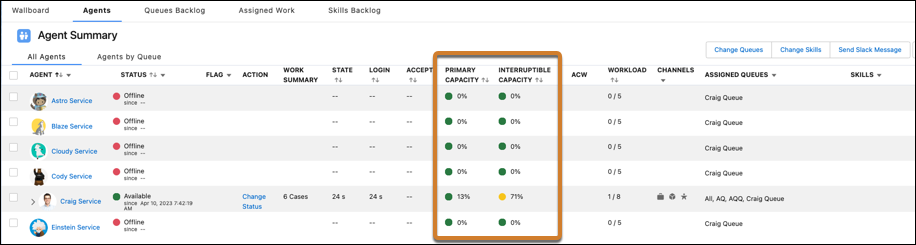
In the Agent tab in Omni supervisor, supervisors see agents’ primary and interruptible capacities. (See image below)
Service Catalog
Service Catalog isn’t really a new feature, but it was formerly only available as part of Work.com. With the Summer ’23 release the feature now becomes available for Service Cloud.
Service Catalog is an easy way to expose screen flows to end users like customers and partners through an Experience Cloud solution. You can easily create categories and assign a title and picture to each catalog item. A catalog item can be a flow that helps a customer to request an upgrade of their product or request a repair in a structured way.
Service Catalog enables you to quickly expose a wide array of self-service options to your customers in a clear user interface with only clicks, no code.
Furthermore, you can create a Service Catalog site that offers your customers and partners a self-service portal for the smooth browsing and requesting of items from your Service Catalog. Building, styling, and launching your site is effortless, thanks to point-and-click Aura components specifically designed for Service Catalog and prebuilt Aura site templates from Experience Cloud.
Another notable enhancement in the Summer '23 release is expanded access to uploaded images. Images uploaded in Service Catalog are created in isVisibleByExternalUsers mode, making file assets available to unauthenticated users by default. This is a shift from the previous default setting where image uploads in Service Catalog weren't readily available to unauthenticated users.
Do you want to learn more about the impact of this Release for Service Cloud?
Connect with Stef, Bianca or Lars
