Salesforce Winter '24 Release
Exploring the Salesforce Summer '24 Release for CRM Analytics
Daan Elshout, Data & Analytics Consultant at Nextview Consulting, will share his favorite new features in CRM Analytics as part of the Salesforce Winter '24 release.
Salesforce Bulk API 2.0
CRM Analytics steps into a new era of efficiency with the upgraded Bulk API 2.0. Developers can now revel in a refined experience as they create, process, and witness enhanced performance in their query operations.
Expanded Object Coverage
The Bulk API 2.0 extends its prowess to over 4,800 standard objects, courtesy of PK chunking—scaling up the optimization from a previously modest number of objects. This broadened scope is set to significantly uplift query performance across a vast array of standard CRM data objects.
Refined Query Processing
In pursuit of seamless job execution, Bulk API 2.0 introduces an intelligent split mechanism for failed batch jobs. By dividing these into smaller segments, the API ensures a higher rate of processing success, moving past the one-size-fits-all chunk size approach of the past.
Unshackled SELECT Clause Character Limit
Developers crafting complex queries have a reason to cheer. The erstwhile 32,000-character ceiling for SELECT statements in SOQL clauses has been lifted, unleashing new possibilities for intricate data retrieval without the constraints of character count limits.
These advancements in Bulk API 2.0 are paving the way for more robust, seamless, and scalable CRM analytics operations.
Analytics Themes
CRM Analytics now offers the convenience of themes, allowing for the swift creation of cohesive dashboards with a consistent aesthetic. Simply select your preferred styles, such as brand colors or border designs, save them as a theme, and apply across all widgets for uniformity.
Available in: CRM Analytics within both Lightning Experience and Salesforce Classic.
How to use: Access Dashboard Properties, navigate to the Theme tab, define your style, and apply it across all widgets with a click.
Table Pagination
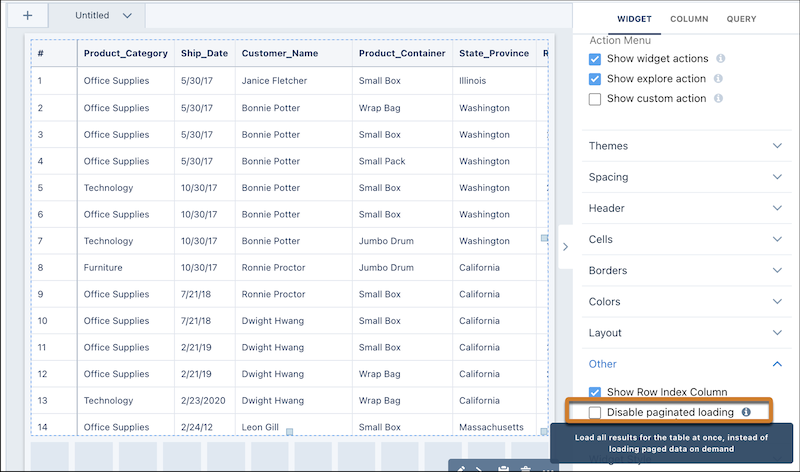
Dashboard tables within CRM Analytics have received a significant performance boost. With new pagination features, tables load quicker by displaying only a segment of data at a time, enhancing responsiveness and user experience.
Availability: This update is accessible in CRM Analytics for both Lightning Experience and Salesforce Classic.
Usage: Pagination is enabled by default for all tables. If needed, you can turn off pagination by editing the dashboard and adjusting the widget properties.
Do you want to learn more about the impact of this Release for CRM Analytics?
Connect with Luuk, Lars, Regina or Glenn.

