Salesforce Winter '24 Release
Exploring the Salesforce Winter '24 Release for Sales Cloud
The Salesforce Summer '23 Release is bringing some great new features to Sales Cloud. Niek Bachman, Practice Manager Sales at Nextview Consulting, will share insights into his favorite new features.
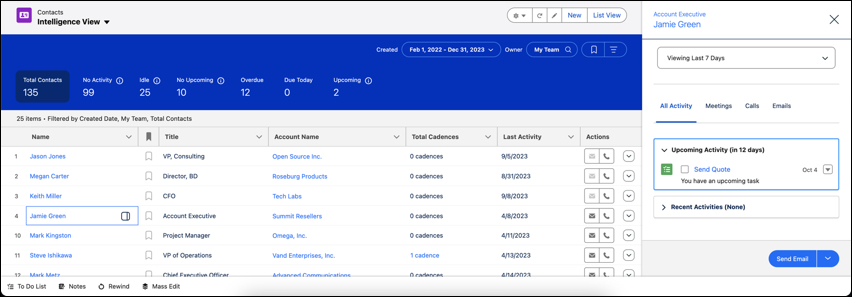
See Which Contacts Need Attention and Take Action Directly from Contact Home
Enabling the Contact Intelligence View is straightforward. Simply activate it in the setup and include the Intelligence View button in your Contact List View layout.
To experience this new view, users can select the Intelligence View on the Contact home page. Those who prefer the traditional list can easily switch back at any time. For new Salesforce customers, the Contact Intelligence View is the default, showcasing Salesforce's commitment to continuous improvement and user-centric design.
Why This Matters: The Contact Intelligence View is set to significantly reduce the time and effort needed to manage contact activities. It offers a more intuitive and actionable overview of contact interactions, ensuring sales teams can focus on what matters most—building relationships and closing deals.
Availability: This innovative feature is available in Lightning Experience across Professional, Enterprise, Performance, and Unlimited Editions, marking another step towards a more cohesive and efficient Sales Cloud experience.
Do More in To Do Lists
Sales reps depend on their To Do Lists to navigate through their busy days, and with the latest Salesforce update, this experience just got a significant upgrade. Now, reps can:
- Apply advanced filters to narrow down tasks and focus on the most crucial items.
- Filter tasks by account to view items related to both the account and its associated contacts.
- Utilize new sorting options to prioritize their list.
- Employ improved search capabilities to quickly find specific tasks.
Efficiency at Your Fingertips:
- Customized Filtering: With just a click on the new Filter icon, reps can customize their view to see tasks that matter most at the moment.
- Intuitive Sorting: By clicking the Sort icon, reps can organize their To Do List to show the most relevant items first.
- Search Smarter: The updated Search feature, accessible via the Search icon, offers suggestions and filter entries to help reps find tasks effortlessly.
- Contextual Actions: Tasks on the To Do List now feature context-sensitive action icons that appear as you hover, making it simple to take immediate action.
How to Access the New Features:
- These functionalities are readily available in the Lightning Experience or via the Sales Cloud Everywhere Chrome extension.
- Reps can interact with individual task cards, which are designed to be compact with an option to expand for more details.
- The To Do List also includes an option to expand or collapse all cards simultaneously for a better overview of daily tasks.
Sales Engagement Cadence
In the Salesforce Winter '24 Release, Sales Cloud users can anticipate notable enhancements in managing sales cadences:
- Automatic Cadence Target Management: With Einstein insights triggering cadence actions, sales teams can automate their workflow and concentrate on selling.
- Quick Cadence Configuration: Sales Engagement Setup now offers an organized approach, making it easier to find and adjust cadence-related settings.
- Extended Cadence Features: Users can handle up to 50,000 cadence targets at once, a significant increase from the previous limit, enabling mass updates with ease.
Revenue Intelligence
Also Revenue Intelligence offers a lot of great new updates and new features including:
- Forecast Insights Dashboard: Track vital changes in your sales forecast to gauge performance.
- Commit Calculator: Experiment with various pipeline scenarios and their financial implications.
- Product Insights Dashboard: Refine sales strategies and understand market trends and product performance across different segments.
- Quota Data Integration: Upload and incorporate quota data into Revenue Intelligence using CSV files for comprehensive analysis.
- Enhanced Einstein Account Management App: An optimized app experience focuses on essential data, accelerating setup and data retrieval.
- Historical Trend Reporting for Formula Fields: Gain historical perspectives on calculated values within your sales cycle, now with support for formula fields.
Do you want to learn more about the impact of this Release for Sales Cloud?
Connect with Niek, Lars, Regina or Glenn

