Salesforce Winter '24 Release
Exploring the Salesforce Winter '24 Release for the Salesforce Platform
The Salesforce Winter '24 Update includes some incredible features for the Salesforce Platform. Rogier Maaten, Solutions Architect at Nextview Consulting, can to tell you all about it!
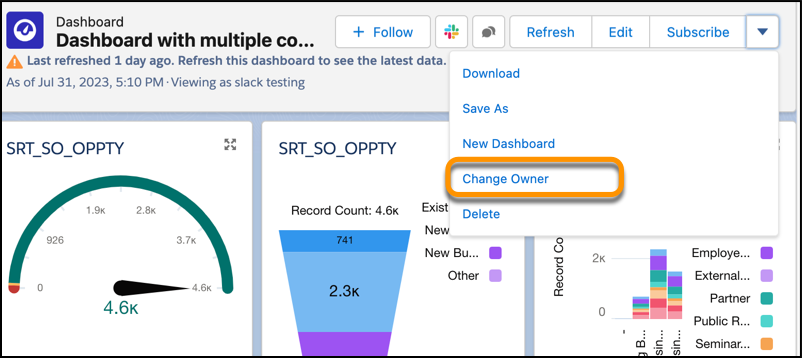
Transfer Ownership of Lightning Dashboards
In the ever-changing corporate world, roles and responsibilities are continually shifting. So what happens to your painstakingly built Salesforce Lightning dashboard when you move to a different team or role? Previously, your organization would have had to clone or recreate it—a tedious and often inefficient process.
Transferring ownership allows for quick and simple transition of dashboard ownership, eliminating the need for duplication and ensuring seamless information flow.
Available across multiple Salesforce Lightning editions, from Group to Developer, this feature requires minimal permissions for use. Either 'View All Data' or 'View My Team’s Dashboards' permissions will allow you to transfer dashboard ownership to relevant team members, keeping your operations agile and effective.
In summary, this new feature cuts down on hassle and time-wastage, empowering your organization to stay flexible and focused. No more rebuilding or cloning—just smooth, efficient data management.
Save Time with Mass Quick Actions on Related Lists
Are you tired of the cumbersome process of creating or updating multiple related records one by one? Salesforce has a solution for you: the Mass Quick Actions on Related Lists feature, now generally available. This feature allows you to use quick actions directly on related lists, right where you need them.
It simplifies data entry by letting you configure quick actions with predefined field values and action layouts focused on essential fields. Users can effortlessly create new records or update up to 100 existing ones—without ever leaving the page.
Applicable to multiple Salesforce Lightning editions, this addition is both versatile and user-friendly. It can be implemented easily either through the Lightning App Builder or the page layout editor, supporting 'Create a Record' and 'Update a Record' quick actions for now.
In short, this feature not only saves time but also enhances productivity by making data management more efficient and user-centric. Say goodbye to tedious record updates and hello to streamlined operations.
Flow Integration
Integrating data across various platforms and systems is a critical, but often challenging, aspect of modern business operations. Salesforce's newly incorporated Flow Integration, available at an extra cost in select Lightning editions, aims to make this process remarkably straightforward.
Flow Integration enables seamless data connections from multiple systems like Slack, Tableau, Workday, and NetSuite right into your Salesforce platform. Now you can effortlessly build real-time, integrated views of your customers and business processes—all with simple clicks.
The feature supports both triggered and timed flows, allowing you to automate processes as simply or as complexly as your business requires. Whether you're importing data from Google Sheets or performing actions on existing data, your options are now incredibly versatile.
Additionally, Salesforce has improved user experience by introducing Custom Error Messages in Record-Triggered Flows. Gone are the days when a generic error message left your users puzzled. Now, targeted error messages can be displayed, rolling back any changes and informing the user precisely what went wrong and how to fix it.
In a nutshell, Salesforce's Flow Integration and Custom Error Messages not only streamline data management but also enrich user experience, making your business more efficient and responsive.
Do you want to learn more about the impact of this Release for the Salesforce Platform?
Connect with Lars or Bianca
